.png?width=400&height=86&name=BrainTap%20Logo%20with%20Tagline%202023%20(1).png)
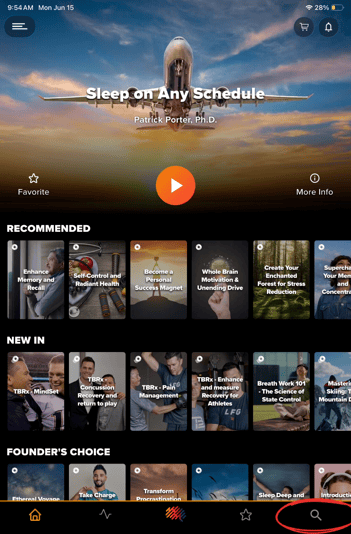
1) The first thing you will do once you have logged into the app, is click the magnifying glass at the bottom right of the screen.
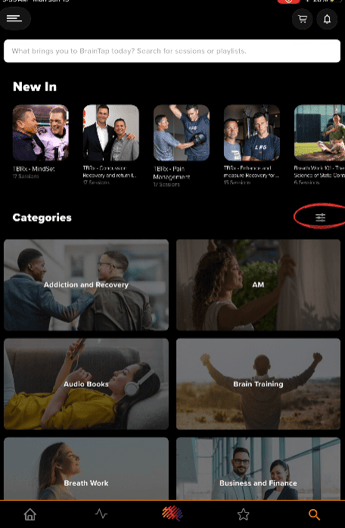
2) Now, you will click the filter icon to the right.
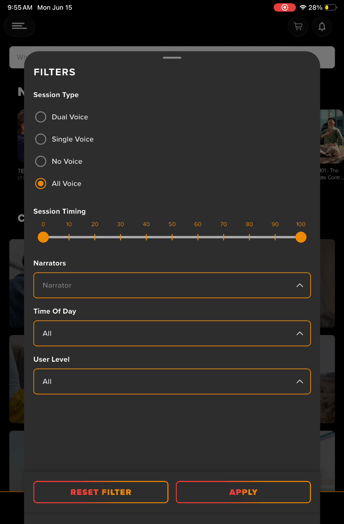
3) This will open up the "Advanced Search Filter" in the app, where you can filter through the Session Type, Session Timing, the Narration, the Time of Day and User Level.
For example, If I wanted to listen to a session in the afternoon. I would click "Time of Day" then "Afternoon" Then click "Apply"
This will show me all the Afternoon Sessions, The Afternoon Categories, Sub Categories, Playlists and Sessions.
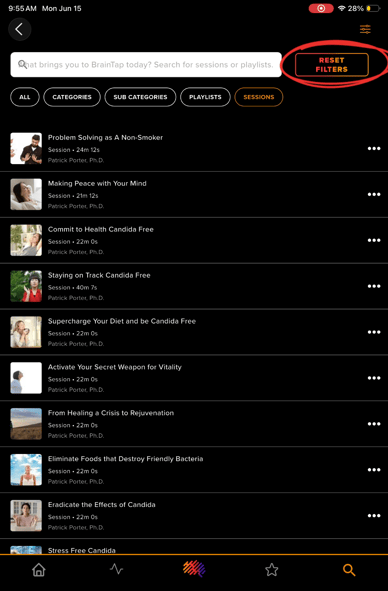
4) If you want to remove a filter you've put on, hit the "Reset Filters" button.
If you have any questions or concerns please contact support at (302) 721-6677 or support@braintap.com