.png?width=400&height=86&name=BrainTap%20Logo%20with%20Tagline%202023%20(1).png)
When scans fail (cut off) in the middle of a scan, or if all 300 heartbeats are collected, but the scan doesn't appear to save, the issue is most likely going to be the RAM on the computer being used. Your computer should have a minimum of 4 GB of RAM, but 6 GB is preferred. If you are low on RAM storage, you will want to upgrade the RAM so more storage is available.
If it is a new computer and RAM is not the issue, then the person's voltage is likely the culprit. Those who have very low voltage or poor circulation can have their scans cut off. See the section, Artifacts, Kickbacks, or scans failing to start below for troubleshoots to do with a person who is having a tough time scanning.
If you can get successful scans between clients who experience failure in completing or saving the scan, then odds are very favorable that the issue is with the individuals themselves. If you are unable to get ANY scans without failing to complete or save, then the RAM is likely the issue.
When experiencing the issue of scan failure, it is important to test the equipment on several individuals (yourself, office staff, family, etc.) and ensure that the failure is happening consistently among everyone being scanned. If you can get successful scans between fails, the NeuralChek and the computer itself are not going to be your issue.
Artifacts, Kickbacks, or Scans Failing to Start
The most common reason a scan fails to start, aside from low voltage, BP, or another issue listed below, is that the scan administrator has placed the lead clips on the incorrect wrist. Ensure that the yellow lead is on the left wrist and the red lead is on the right wrist. If the clips are incorrectly placed, the ECG will appear to be upside down the scan will not officially start.
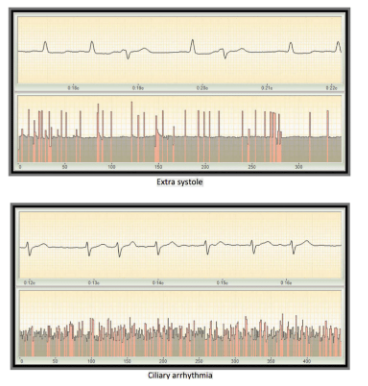
A scan will fail or "kick back" due to too many artifacts present in the 300 heartbeats. Artifacts appear as pink lines in the rhythmogram and can be caused by high blood pressure, low pulse, poor circulation (due to blood viscosity or lower than the lower body temperature), arrhythmia, or stins. If this occurs, the following steps should be taken:
- Ensure the client's legs/ankles are not crossed and that their hands are not touching.
- Make sure that the hands are on the table and/or near heart height. If no table is present, hands can be slightly elevated by placing a pillow on the lap of the client.
- If the client is cold, allow them to put on a jacket or sweater. If they did not bring one, have a blanket on hand to drape over their shoulders.
If these immediate steps do not remedy the problem, move to the steps below:
- Stop the Scan by pressing the same button you pressed to begin the scan, and move the Yellow lead clip from the left wrist to the left leg just above the ankle bone. Spray saline or water on the skin before applying the clip. Restart Scan
- If artifacts remain present, stop the scan again and disable the error filter using the following steps:
- Navigate to the "Names" tab on the left side of the screen (double click anywhere in the gray area if still in the client's profile)
- Right-click on the client's name
- Select "Disable error filtering for the next exam."
- Restart scan
If two consecutive scans fail, have the client stand up and walk around the room for a moment, take a drink of water, and then have them sit and try the scan again
The disabling of the error filter should only be done as a last resort, as this will produce a scan that is unreliable. We only recommend using this method for clients who are insistent on getting scanned during their appointment with you. We also recommend stating the disclaimer to the client that the disabling of the filter will produce unreliable scan results, and that it will likely not be an accurate representation of where they are.
You can always check the accuracy of the scan by clicking the bar graph icon in the right-hand corner of the Rhythmogram, and you will find the results are either high, satisfactory, or low.
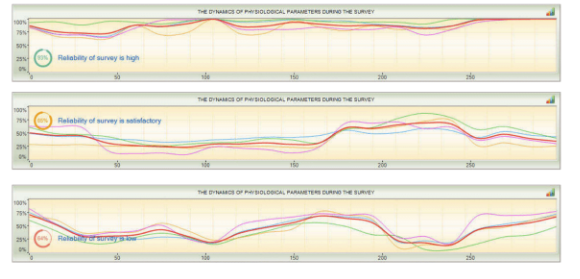
Rather than focusing on the lack of a successful scan at the appointment, use this time to discuss lifestyle, habits, and patterns that may have contributed to the imbalance in their ANS that prevented the scan from occurring at this visit. These may include:
- Mental Stress
- Physical Activity
- Alchohol intake
- Caffeine
- Digestion
- Water Intake
- Time of Day
- Diet
- Poor Sleep
- Illness
- Other Therapies undergone
- Nicotine
- Shallow Breathing
- Emotional Stress
- Fatigue
It should be remembered that not everyone will be able to be scanned. 90% or more of your clients will scan successfully every time you work with them. With some, you may get a scan at one session and then, due to one of the items listed above, or another potential reason, you won't get them at their next visit. Depending on your client demographics, a very small handful may not ever be able to successfully complete a scan. These individuals include those with:
- Paacemakes
- Stints
- Arrythmia
- Irregular Heart rate
- Low blood pressure/low pulse
- Poor circulation
If you have additional questions, please reach out support team at (302) 721-6677 or Support@braintap.com